Além disso tem processamento não destrutivo de raw, edição em 32 bits e ferramentas de astrofotografia (que servem pra um monte de coisas além da astrofoto). E custa 40 dólares por uma licença perpétua.
Só não farei o update para a versão 2 porque realmente não preciso. Comprei o Publisher e o Design por impulso em uma promoção, super barato. Mas uso basicamente o Photo.
Uma coisa engraçada é que consigo rodar o AP em um macmini white pré histórico (core 2 duo 2.5 com 8gb de ram, El Capitan) perfeitamente com imagens de 36 MP sem o menor problema, bem fluido. Já com o LR hahahaha !
Eu não precisava, embora a edição não destrutiva de RAW seja bem interessante. Comprei pra sustentar a empresa.
Me assusta saber que a edição de raw era destrutiva :eek:
Quando vc importa do LR pro PS, a edição se torna destrutiva. Não pro arquivo raw, mas para o processamento. Agora no Affinity, vc processa o raw e depois passa pra “persona” de edição. A qualquer momento vc pode voltar no raw e reprocessar, e todas as mudanças vão refletir no ponto em que vc estava na edição.
Processo os raws no DxO na maioria das vezes, e se for algo muuuuuito especifico algum outro programa.
O Affinity uso para outras coisas que não a conversão do raw em si.
Agora seria como é quando Importa como Smart Object no Photoshop?
Teve Update para versão 2.0.4.1701… mas não estou achando o release notes.
We are pleased to announce an update for the Windows release of Affinity Designer 2, version 2.0.4
This build is available as a (sandboxed) MSIX application installer and as an (unsandboxed) MSI/EXE traditional installer.
Please see this FAQ thread for instructions on how to access the unsandboxed MSI/EXE version.
The changes in Affinity Designer 2 for Windows 2.0.4 (those made since the last release Affinity Designer 2 for Windows 2.0.3) are as follows:
Fixes & Improvements: (since the last release 2.0.3)
Cannot set stroke width if units not set to points. [AFD-6276]
Some image resources are being replaced by others from the same document when copy/paste was used to insert them. [AFB-7053]
Fixed non-ASCII characters not being accepted in license usernames
Fix New Document sometimes showing Letter* instead of A4
Editing an embedded PDF does not create a History step, meaning changes are lost when closing as no save prompt is shown
Assorted stability fixes
Help & localisation improvements.
Assorted other Licensing and Registration improvements
To get notified when any new releases are made please follow the latest releases thread by clicking here
UPDATING TO THIS VERSION (which is free for all V2 users)
The software version can be seen on the splash screen and the About dialog (in Help > About Affinity Designer ).
If you’ve purchased from the Affinity Store — each time you start the Affinity Store software it will check for updates and offer any available update. The latest update will install over the top of any earlier version, with no need to uninstall. You can download the latest installer by logging into the affinity store here and find the order in your account and use the “Download” button in there. Alternatively, this new release (and previous versions of Affinity Publisher for Windows) can be downloaded from this link. (those installers are NOT for Windows Store purchases).
If you’ve purchased from the Microsoft Store — Microsoft Store updates are done automatically by the operating system (each time you start the application). If this does not happen for you, open the Windows Store app and click the three dots in the top right corner of the app and then go to Downloads and Updates. Click Get Updates. This should hopefully force the update to show.
Vc foi mais rápido que eu… Mas note que essa é a atualização do Designer. A do Photo é essa (o fórum tem um bug estranho que implica com release notes em geral):
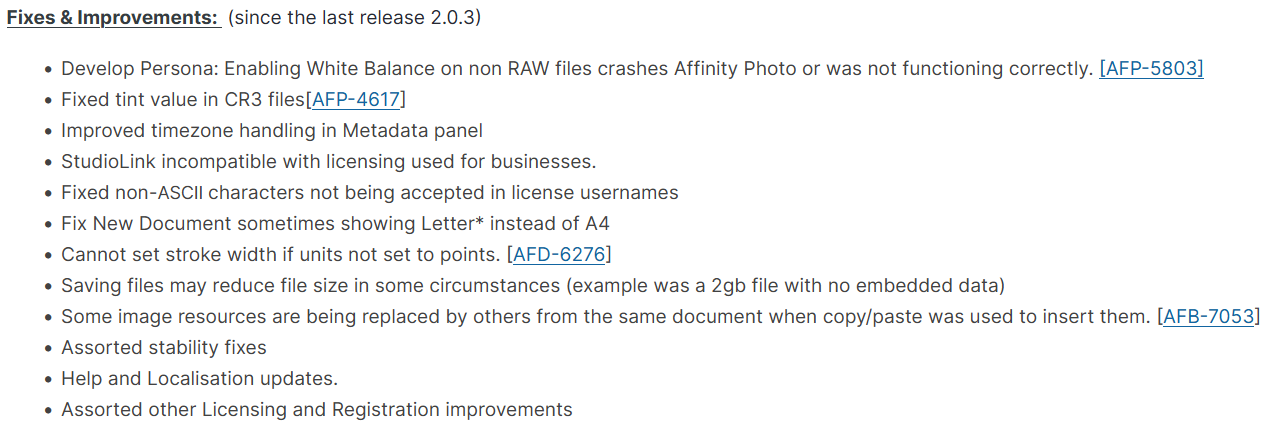
Isso é bom:
This build is available as a (sandboxed) MSIX application installer and as an (unsandboxed) MSI/EXE traditional installer.
Fiquei curioso em entender o que isso significa, poderia me dizer por favor?
É a aporrinhação de instalar aplicativos dentro do %ProgramFiles%\WindowsApps. Essa pasta não é acessível facilmente, mesmo pro administrador de sistema.
Resolve esse problema aqui, que eu tenho até agora e finalmente vou resolver:
Ver aqui também:
https://www.advancedinstaller.com/msix-limitations.html
Se pode complicar… pra que facilitar né! hahaha
Essa eu não sabia.
Mas isso aí é coisa do W10, W11 e provavelmente a maioria dos programas para Windows seguirão esse padrão.
É uma idiotice mas nada assim muito estranho por parte da Microsoft.
Saiu a versão 2.1. Mudou coisa pra caramba.
O fórum continua dando problema quando se coloca changelogs, então tem que olhar o link aí em cima.
2.1.1:
Bugs affecting all platforms
PDF imports with unsupported characters for the 'Subject' field, then fails to export out to PDF.
Crash when enabling document Baseline Grid due to Running Headers on Master Pages.
Crash applying a Paragraph Style to a Running Header within a small text frame.
Non-breaking hyphens no longer draws, though does not affect ALL fonts.
Crash adding pages into a facing page document with flowing text.
Help updates
Bugs affecting Desktop (Windows and macOS)
'Title' and 'Description' fields are not read from the XMP sidecar files.
Batch Processing RAW files creates incredibly dark results.
Data Merge sources stored on a Cloud drive can crash the app when deleting data source.
Bugs affecting Windows
Export dialog correctly handling transparency again.
Cropping in the develop persona does not visually apply crop.
Changing the Opacity of an object via the Colour panel dropdown fails to visually update the object on the canvas.
Fields Panel- changing the contents without pressing enter causes the fields to clear when enter is next pressed in a field.
Bugs affecting macOS
NIK Collection: Crash when closing app after Colour Efex.
Crash after deleting a template file.
Bugs affecting iPad
Version number in iPad settings is full version number not just build.
Stroke width cannot exceed 100 in any unit in Stroke Panel.
Saiu semana passada a atualização 2.4.0! 
Gratuita pra quem tem a versão 2.x. Traz várias mudanças interessantes.
Já perdi a conta, mas o Affinity Photo já está na versão 2.5.*. Mas a notícia do dia é que a Affinity está oferecendo uma versão de demonstração de 6 (seis!) meses. Sei que tem gente que tem calafrios de pensar em sair da Adobe, mas vale muito a pena testar o Affinity Photo. A empresa ainda não possui uma ferramenta parecida com o Lightroom, mas o Photo não deixa nada a dever pro Photoshop.